How to Check SSC Result 2026 by Roll Number, Registration & Board
Step-by-step guide to checking your SSC Result 2026 by roll and registration number for every education board — plus fixes for the most common "result not found" errors.

Check SSC Result 2026 by Roll Number, Registration & Board
Key Takeaways
- Both roll number and registration number are required — a security measure
- elect "SSC/Dakhil" not "SSC (Vocational)" unless applicable
- eboardresults.com often loads faster than individual board sites on result day
- "No result found" is almost always a data-entry mistake, not a system error
- Rescrutiny applications open 7–10 days after publication
Table of Contents
How to Check SSC Result 2026 by Roll Number, Registration & Board
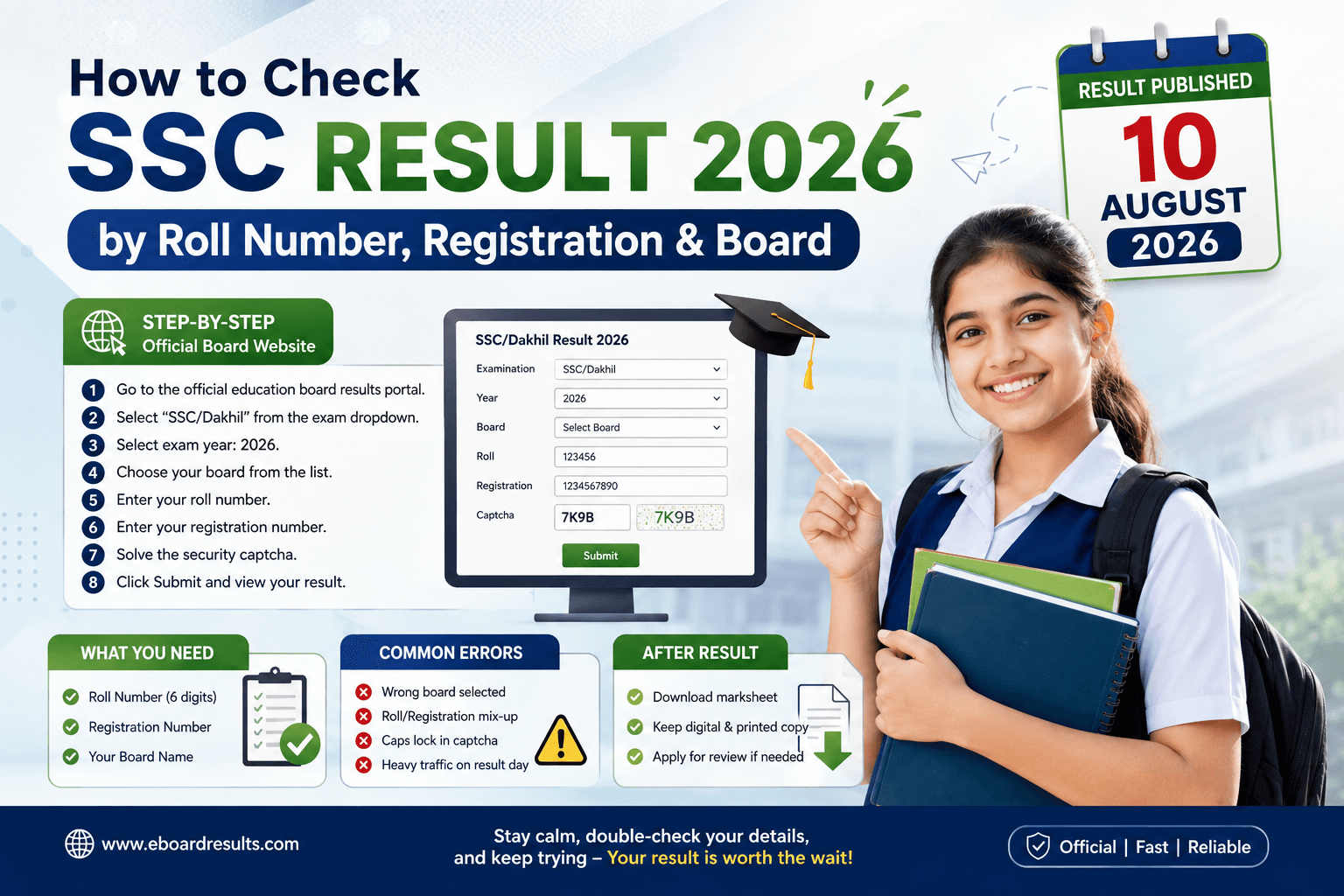
SSC Result 2026 will be published on 10 August 2026. Checking your result sounds simple — enter a few numbers, hit submit, done. But every year, thousands of students hit "no result found" errors, timeout pages, or wrong-board mistakes on the biggest day of their academic life so far. This guide walks through the exact process board by board, plus the small mistakes that trip people up most, so you're ready before the 10th.
What You Need Before You Start
Keep these three things next to you before results go live:
- Roll number — printed on your admit card, usually 6 digits
- Registration number — a separate, longer number also on your admit card
- Your board name — the board that administered your exam, not necessarily where your school is located
A lot of "result not found" errors happen simply because students mix up roll number and registration number, or select the wrong board. Double-check both against your admit card, not from memory.
Step-by-Step: Checking on the Official Board Website
- Go to the official education board results portal.
- Select "SSC/Dakhil" from the exam dropdown (make sure you're not accidentally on the JSC or HSC tab — this is the single most common mistake).
- Select exam year: 2026.
- Choose your board from the list.
- Enter your roll number.
- Enter your registration number.
- Solve the security captcha exactly as shown (case-sensitive on some boards).
- Click Submit.
Your result should appear instantly, showing your GPA, subject-wise grades, and a pass/fail status.
Step-by-Step: Checking via eboardresults.com
This portal mirrors results from all boards in one place and is often faster than individual board sites right after publication, since traffic is distributed across a more robust system. The form fields are identical: exam, year, board, roll, registration, captcha.
Board-wise Notes
Each of the following boards manages and verifies its own SSC results, though they're checked through the same central systems:
- Dhaka Board — largest candidate pool, expect the heaviest server load in the first hour
- Rajshahi Board
- Comilla Board
- Jessore Board
- Chattogram Board
- Barisal Board
- Sylhet Board
- Dinajpur Board
- Mymensingh Board
- Madrasah Board (Dakhil) — use "Dakhil" not "SSC" in the exam dropdown
- Technical Board (SSC Vocational) — use "SSC (Vocational)" in the dropdown
If your school is under one board but you took the exam as a transfer student from another district, always check the board printed on your admit card — not your school's usual board.
Common Errors and How to Fix Them
"No result found" Almost always a data-entry issue. Re-check every digit of your roll and registration number. If both are correct and you still get this error, wait — sometimes individual board databases sync a little later than others in the first hour.
Page won't load / times out This is a traffic problem, not a problem with your result. Try:
- Refreshing after 10–15 minutes instead of repeatedly hammering the page
- Switching to eboardresults.com if the official board site is overloaded
- Using the SMS method as a reliable fallback (see our SMS result check guide)
Wrong subject grades showing This is rare but does happen due to data entry errors at the board level. If your grades look genuinely wrong (not just lower than expected), you can apply for a result review/rescrutiny through your school within the announced window — typically 7–10 days after publication.
After You've Checked Your Result
Once you've confirmed your result, download the detailed marksheet PDF for your records — you'll need it for college admission applications. Keep both a digital copy and a printed copy; some college admission portals still request physical submission alongside the online application.
Final Tip
Bookmark the official portal and eboardresults.com in advance, and have your admit card photographed or scanned on your phone so the numbers are always within reach. On result day, patience matters more than speed — the data is correct even if the servers are slow.
Frequently Asked Questions
Why does it say "no result found" even with correct numbers?
Which board should I select if I transferred schools?
What if my subject grades look wrong?
Verified Official Sources

Sheikh Jalal
Senior Education Editor & Publisher
Sheikh Jalal is the founder and publisher of BD Results, holding an MSc in Physics from National University, Bangladesh. He has over a decade of experience building and managing web platforms, including self-hosted infrastructure for education and information portals. Jalal personally verifies every result date, routine, and admission notice published on this site against official Education Board and Ministry sources before it goes live, ensuring readers get accurate, up-to-date information they can rely on.
Looking for Exam Results or Job Updates?
Never miss an important notice. Browse our primary sections for verified board results, admission test details, and government job circulars.